657
why hard exit editor? Nano say at bottom.
(files.catbox.moe)
me like use nano. nano say how do thing. nano exit easy.
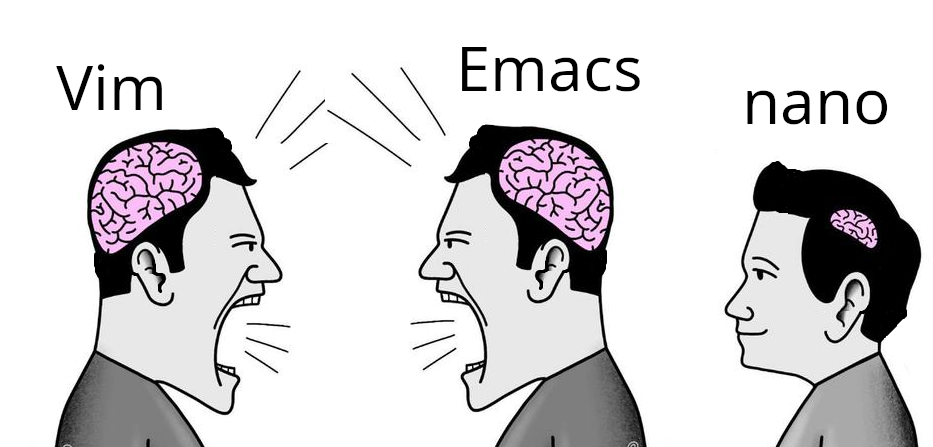
me like use nano. nano say how do thing. nano exit easy.
The image is misleading. The brain sizes represent the amount of grey matter it takes to operate the editor. The nano guy has plenty of brain power left over for things like hygiene, breathing and basic reasoning.
vim guy, emacs guy look big brain. me brain smol. me bathe yesterday, thank you.
Vim users: "I feel bad for you"
Nano users: "I don't think about you at all"
Nano users :
Me no think
Nano users have more important things to think about, saying this as an nvim user
I think it's more likely the opposite.
I do appreciate this in nano. It helps me complete the new container config occasionally required to install vim.
I'm team nano, I'm not smart enough to use the other two and for whenever I need to open a text file in terminal only environment once every year I can remember how to navigate nano. So I'll keep using nano.
Yes. It's newby-friendly, what is great for the time every 2 or 3 years that it opens in my face and there's no alternative editor installed.
Copy and paste are there too, but there's no reason to use them instead of the terminal buffer, so I can edit things in an editor I like. I just wish it made it easier to delete several lines at the same time.
CTRL-K,K,K...
That’s racist
Never ceases to amaze me how people get so exercised over a text editor.
I remember the time when Linux jokes were about audio drivers and X11 config files, but audio has long been working out of the box, and X11 is already dead and cremated.
Even recompiling kernel now takes around five minutes instead of two hours, so that joke is irrelevant too.
So all we are left with is timeless discussion of which text editor is the best, and dumping on Windows.
This has been a lighthearted fake rivalry for as long as these text editors have existed.
That's because we all know which is the obvious superior text editor.
nano gang represent😎
I can use Vim, it was the choice for years. But I actually like using nano because it's what I need and all I need.
micro enters the chat.
Static, portable binary with no dependencies.
Out of the box:
I have nothing to do with the project but this binary is the absolute best. curl or wget to any host and away you go with effectively a Sublime Text / VSCode like in the terminal. It’s as simple as nano and as functional as a well configured and extended vim.
It’s baffling it’s not more well known and not installed by default on major distros.
That’s not a text editor, that’s an IDE.
IMO it needs better LSP support and things like refactoring, smart auto completion, and go to definition for a range of languages to be considered an ide.
I love nano. I used to do tech support for a Linux-based content management system (before SAaS take took off).. The customer sysadmins were sometimes whichever engineer was volun-told to do it, so competency varied wildly.
I helped mostly with installs. This might be the poor newbie sysadmin's first time on the command line. Nano was my go-to suggestion for editing config files--all the commands are right there! Much less intimidating than vi or emacs for a newbie.
Nano you can pick up in ten minutes and master in an afternoon. By that time you’re still reading the intro to vim or eMacs.
nano is just a text editor, I use it as a text editor, it has keybindings on screen by default, no need to config or memorise, why bother? (for text editing, not whatever people use vim or emacs for)
I use micro. It's 1000x better.
Today I learned about the existence of "milli" and "kilo", both of which are terminal-based text editors! Quite interesting. I wonder if there are any more SI unit prefix text editors...
Honestly nano is perfect for quick edits. Vim and Emacs are powerful, but sometimes you just want to open a config file, change one line, and exit without fighting the editor. 😄
This is what i use vim for. Vim doesn't necessarily have to be a full blown ide with 30 plugins
I used some distro with vim back in the day and I just kept using it. I lose my shit when I use something with just nano and my muscle memory tries to do a vim thing.
Some real talk.
Can we just include the 4 most popular text editors on basic systems??
Like i wanna scream when there isnt my text editor installed on a lightweight distro.
Vi Emacs Micro Nano
For context,
Debian ships with nano and vi Openwrt only ships with nano
Like cant we just include small editors. In a perfect world i would want neovim installed. But i understand its larger and has alot more dependency's.
So having VI isnt as good but im willing to be reasonable.
JUST INCLUDE VI
the reason i learned vim is because VI is installed by default on almost every distro.
Im tempted to try emacs tho
I don't get why there's so much prejudice towards nano users in the Linux community, people act like nano is useless but it performs its job well, and it does it without being large or overly complicated.
nano is usually built in. Adding another one is just redundant if all you're using it for is editing an occasional config file.
Honestly never understood the hate for it. Who cares? Petty, stupid, nerd-wars over little crap like a text editor is the reason average people don't even consider linux.
Just use ed.
Ctrl+D. Easy.
bash: ed: command not found
WHERE GOD NOW?
What sins have you committed on your system to remove ed?
fastfetch | grep ackage
Packages: 2530 (dpkg), 21 (flatpak)
me no remove package. me start with vanilla debian install. no need gui until me choose to install gui.
Meanwhile in an alternate universe, two people argue about edit vs edlin… 😆
I first ran into nano when I gave Gentoo a try. I had to edit a few config files, so I ran vi... no vi. Emacs? No Emacs. Well, shit, what am I supposed to do? So I went back a bit and read more carefully, apparently there was a thing called nano.
So I ran that. Ew. It was a clone of an old DOS editor of all things. What kind of lunatic had ported that? Anyway I managed to do my edits with it, added normal editors to the system and was on my way.
It was also the last time I used it.
nano is the perfect editor for people who only use editors in the terminal, once in a while to edit a config file.
Linux text editor discourse has been baffling to me for decades now. I don't care which you use, and I care even less about why.
Nano or as I like to call it "The Sudo Editor"
I love how people fight over what's the better editor. I just use whatever makes sense for the time, and it's not always the same one. But if you're happy with just one of them and can make it work for you in any situation, then you do you. That's the point of Linux, or so I thought.
Welcome to Programmer Humor!
This is a place where you can post jokes, memes, humor, etc. related to programming!
For sharing awful code theres also Programming Horror.