[-] Quibblekrust@thelemmy.club 5 points 20 hours ago

I can't believe they didn't put this one in there!

[-] Quibblekrust@thelemmy.club 1 points 20 hours ago

What do you mean about data harvesting? (Other then usage telemetry)

[-] Quibblekrust@thelemmy.club 1 points 20 hours ago

Yes, I see my error now. Thank you.

[-] Quibblekrust@thelemmy.club 20 points 1 day ago* (last edited 20 hours ago)

There's so much repeated paranoia in this article. He makes the same weak points over and over.

But how do you keep track of what a black box actually does when it’s turned on?

And later,

And yes, yes - disabling features is all well and good, but at the end of the day, if these AI features are black boxes, how are we to keep track of what they actually do?

Why would you have to care? You turned them off. The browser is open source. You can see how it invokes the LLMs. If you turn off the features that invoke LLMs, it will not invoke LLMs. I don't get it. Where's the disconnect here? The browser is not a black box. The LLM it talks to in the cloud is a black box. If it doesn't talk to any LLM... 🤷‍♂️

The core browsing experience should be one that fully puts the user in control, not one where you’re constantly monitoring an inscrutable system that claims to be helping you.

Jesus... The bias in this article is extreme and repeated often. "claims to be helping"... he even said earlier that LLMs have a measurable utility. Why are they suddenly merely "claiming" to be helpful?

Why do you have to constantly monitor something you turned off? Really? Constantly?

Even if you can disable individual AI features, the cognitive load of monitoring an opaque system that’s supposedly working on your behalf would be overwhelming.

"Overwhelming cognitive load". Riiight. I turned off telemetry in Firefox as soon as I installed it. I don't constantly monitor that setting. There is zero cognitive load. I'll do the same to the AI features if I don't want them. Also, again with the "supposedly working for you" or "claiming to be helpful" language. Such bias.

They promise AI will be optional, but that promise acknowledges they’re building AI so deeply into Firefox that an opt-out mechanism becomes necessary in the first place.

That's such terrible logic, but so is my original counterargument as pointed out by Undertaker below.

~~If something has an opt-out, it has to be "so deeply" built into it? Are the current new-tab features deeply built into Firefox? Like Pocket and such? They're opt out. Are address bar completions "so deeply" integrated? They're opt out, too. Is the crash reporter "so deeply" integrated into Firefox? That's opt out!~~

~~Hell, you could argue crash reporting is deeply integrated because maybe there are many try-catch blocks all over the code which use it, but if you're the kind of person who turned it off, does it require an "overwhelming cognitive load" to keep it off? Nonsense.~~

I still don't think turning a setting off requires "overwhelming cognitive load".

This article is a bombastic mass of paranoia and bad logic.

If Firefox releases AI things you can't just turn off, that can be easily invoked by accident—gestures, keyboard shortcuts, or whatever—that might send page content to an LLM, then I will stop using it. Until then, I'm happy with Firefox. It will always be more up to date than the derivatives.

22
submitted 2 days ago* (last edited 1 day ago) by Quibblekrust@thelemmy.club to c/thunder_app@lemmy.world

Version v0.8.1. Android 16. Pixel 7 Pro.

After scrolling a couple pages (endless scrolling is on) I start seeing "Instance of 'LemmyApiException'". Once it starts, the tiniest amount of scrolling—even upwards—causes the error. I can make a bunch of rapid, itty bitty scrolls, and each one will hide and reshow the error.

What is Thunder doing with the API on every single scroll? Even up? Makes no sense.

I don't have "mark read on scroll" enabled, or anything odd. I haven't changed any settings in weeks, and this started happening just a few days ago. It might only be happening on my home instance. I could test with an alt.

Update: I can't reproduce this using a lemmy.world account

[-] Quibblekrust@thelemmy.club 3 points 2 days ago

Not me. I switched to using hydrogen decades ago.

[-] Quibblekrust@thelemmy.club 18 points 2 days ago

This is all wrong! You can't just connect the batteries like in the photo. You have to put the batteries on rose quartz! You will hear an amazing improvement! It is not good to put them next to each other, they must be in contact with the crystal!

SpoilerContent stolen from a totally serious comment on the blog post.

[-] Quibblekrust@thelemmy.club 5 points 5 days ago

We only know what we can measure. We don't really know what an atomic nucleus looks like, for example. We can only measure what happens when another particle hits it. Between measurements, it might not even be real. We don't even know what measurement is.

Pick your favorite quantum interpretation: Copenhagen, Broglie–Bohm, Many Worlds. We'll probably never know the truth.

[-] Quibblekrust@thelemmy.club 10 points 5 days ago

Lack of space was Fermat's excuse for not proving his last theorem.

[-] Quibblekrust@thelemmy.club 5 points 6 days ago* (last edited 6 days ago)

analysis finds that cameras lead to persistent and sustained reductions in crashes.

You should have put that in the title.

89
submitted 1 month ago* (last edited 1 month ago) by Quibblekrust@thelemmy.club to c/programmer_humor@programming.dev

By viewing this post you are infected, and all future clocks you attempt to make will fail to render, too.

17
submitted 2 months ago* (last edited 2 months ago) by Quibblekrust@thelemmy.club to c/thunder_app@lemmy.world

Update: It's worse than I thought. It's crashing my VPN! I use the Mullvad VPN app. After that crashes, Thunder crashes. This happens every time.


First, it slows way down and stutters a bit, then turns all black and crashes to my home screen.

Is this happening to anyone else?

Android 16. Pixel 7 Pro.

44

If not, can you please add a setting to disable it? It's just not for me. At best it's a distraction while I wait for the image to load. At worst, it blocks part of the image.

[-] Quibblekrust@thelemmy.club 55 points 2 months ago

Umm... That's just alphabetical.

13
12
11
submitted 3 months ago* (last edited 3 months ago) by Quibblekrust@thelemmy.club to c/signal@lemmy.ml

Android 16, Pixel 7 Pro. My Signal data was getting too bloated, so I backed it up, moved the backup to PC, and verified that signalbackup-tools can decrypt and extract the backup. Cool. Now I want to wipe the data in the app while not losing any settings or contacts or anything.

In the app, I went to Settings > Manage storage > Delete message history. It pops up two separate confirmations, and I hit "Yes" to both. After waiting a bit each time, I did this three time. It hasn't gone well.

  • Signal storage settings still says it's using almost 9 GB of data.
  • However, Android says Signal is using just 154 MB of user data.
  • All of my conversations and messages are still in Signal, but the media in each conversation shows a broken icon.
  • The "Review storage" screen in Signal still shows tons of media with thumbnails, but none open. Tapping on one just shows a blank camera roll and black space.

So, I went to "Review storage" and it let me do a select all and delete, saying, "Are you sure you want to do this? This will delete 9 GB of messages". I said yes, and it's still going. I hope this will at least delete the ghost media.

I suppose I could set a message duration in settings and let old chats expire, though I'm not really against keep the text messages. It was just years of cat photos and videos taking up way too much space.

But why isn't this feature working?

Update:

My phone screen turned off and when I re-opened it, the progress spinner on the delete progress is frozen. I can't cancel or anything. I can give it more time, and force close the app if I have to, but it's not looking good.

Update 2

I swiped the app away from the app switcher, and I was able to open it again and see conversations and such. When I opened settings, it showed that it was using 4.7 GB, and when i closed and reopened settings, it was s tiny bit smaller. Sure enough, after waiting a full hour, it now says it's only using 67 MB of storage, and all the thumbnails are gone from the media list. So... success?

I still have years worth of plain text messages, and I guess I don't mind that.

53

I woke up one day and Fennec wouldn't browse any web page. Like, if I do a search, which goes to DuckDuckGo, I get a loading bar that never goes anywhere. (See screenshot).

If I disable all of my extensions, it'll work again. Then, if I enable them one by one to try to find the culprit that was making Fennec not work, it doesn't break! Until it does, randomly. I basically can't easily reproduce it working or not working.

I switched to IronFox, and installed all the same extensions, and have had no problems for two days.

Extensions:

  • JShelter
  • UBlock Origin
  • Decentraleyes
  • Cookie AutoDelete
  • Absolute Enable Right Click & Copy
23
submitted 3 months ago* (last edited 3 months ago) by Quibblekrust@thelemmy.club to c/linux@lemmy.ml

Update #1

I fixed my boot issue, but now I have to fix the issue with snapper not working right.

The boot issue: Something—I don't know what—added a removable drive to fstab, and the error was that drive couldn't be mounted at boot. I have two guesses:

  1. I formatted a microSD card using YaST Paritioner sometime before doing the distro upgrade.
  2. The drive might have been mounted during the distro upgrade, though I don't think it was.

At any rate, I commented out that line in fstab and it booted right up.

Mullvad is working fine when I boot normally. I guess it was only broken when booting a snapshot from before I upgraded it.

Update #2

I also fixed /.snapshots by adding it to fstab. Now it gets mounted on every boot, and this version of fstab will be in all future snapshots. I just took a manual snapshot for good measure.


I don't know which action caused the issue, so I'm going to list everything I did. I'm new to OpenSUSE Tumbleweed, and I haven't used Linux since like Linux Mint 17.

  1. I disabled KWallet because I got tired of typing in a password every time my desktop launched just for wifi passwords. I decided to just let Linux store them in plain text since my whole system is encrypted with LUKS.
  2. I did a distro update. (zypper dup) After that succeeded, I logged off and back on.
  3. I noticed Mullvad had a new version. They don't officially support OpenSUSE, so I downloaded the new RPM. I ran rpm -e mullvad-vpn to remove the old one. That might have been a mistake since my notes say I used zypper to install it the first time. I installed the new one with zypper. It launched and connected just fine.
  4. I had some trouble getting network settings to store/retrieve my wifi password, so I decided to reboot my system since I changed so much stuff.
  5. It wouldn't boot. I see a few "BIOS" and "ACPI" errors.
  6. Time to try out Snapper! I reboot and choose the most recent snapshot from before tonight.
  7. It boots, but when I try snapper rollback I get IO error (.snapshots is not a btrfs subvolume)
  8. I get the same error trying to open the YaST snapshot viewer.
  9. I check btrfs, and I see @/.snapshots plus a bunch of numbered snapshots, of course.
  10. I check fstab, but I don't see an entry mounting anything on /.snapshots.
  11. I do see a directory at /.snapshots, but it appears just be an empty directory.

Mullvad seems broken with this snapshot. I can't connect to the internet. The mullvad-daemon won't start, so I think the killswitch is active. I've had to type all this on my phone.

What can I do to fix this? I just want to rollback to this good snapshot, and then I can worry about fixing Mullvad when the filesystem isn't read-only.

One month. That's how long it took me to break my system. ☹️

13

I've had three comments in my inbox for about a week and every day I try to mark them as read, but it doesn't work. They disappear from the list at first, but then when I refresh they're still there. I get the error in the picture which says, LemmyApiException: couldnt_find_comment_reply

I just went to the website and logged into my instance, and I had no problem marking the comments read from there. They disappeared from my Thunder inbox, too, after a refresh.

I saved one of the comments for debugging purposes, in case there's something we can look at.

[-] Quibblekrust@thelemmy.club 50 points 4 months ago* (last edited 4 months ago)

I fixed it.

[-] Quibblekrust@thelemmy.club 135 points 4 months ago

I am so grateful for this post! You always post such interesting content. 🦐⛹️‍♂️📷

6
submitted 10 months ago* (last edited 10 months ago) by Quibblekrust@thelemmy.club to c/pixeldungeon@lemmy.world

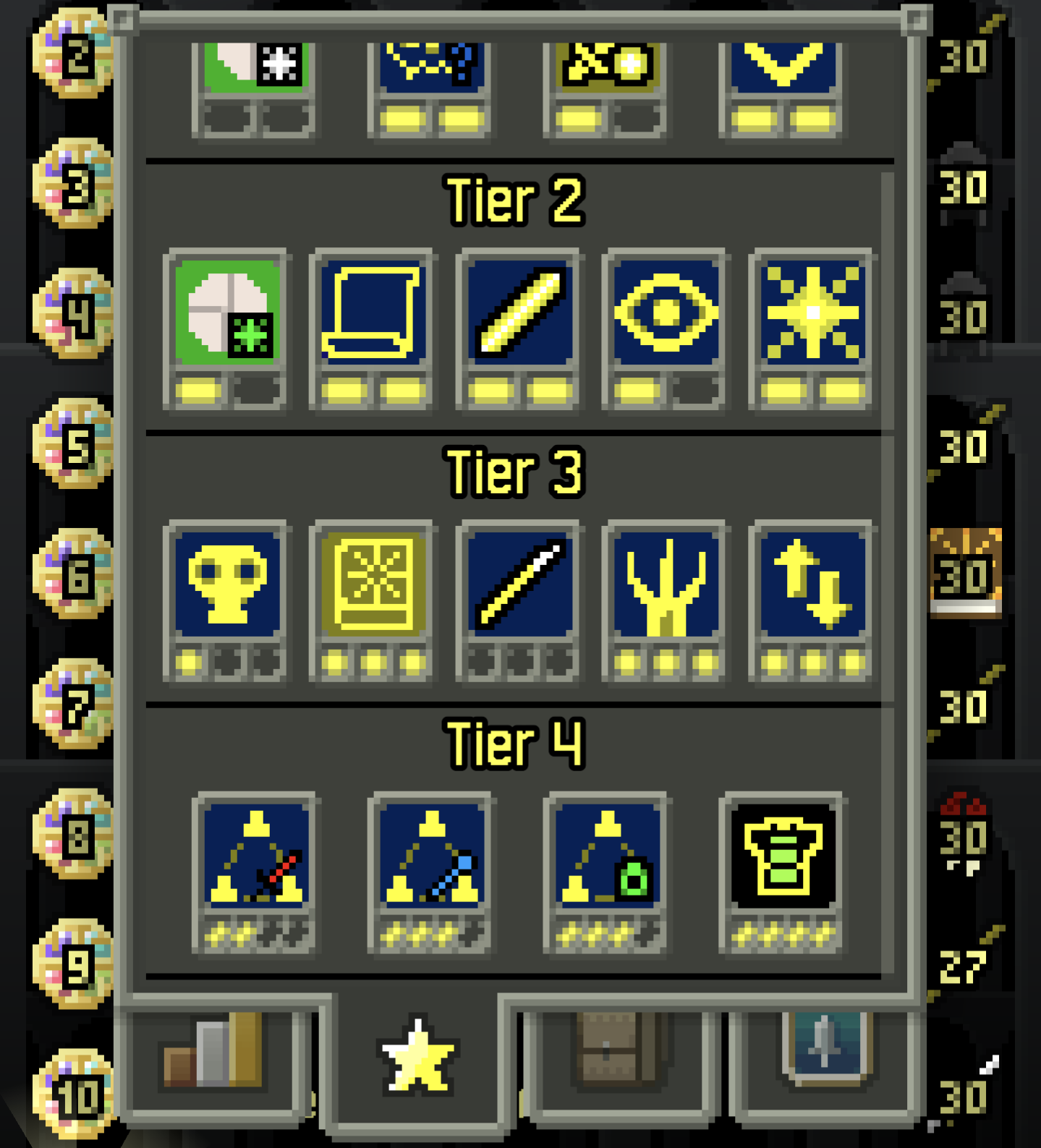
Talents:

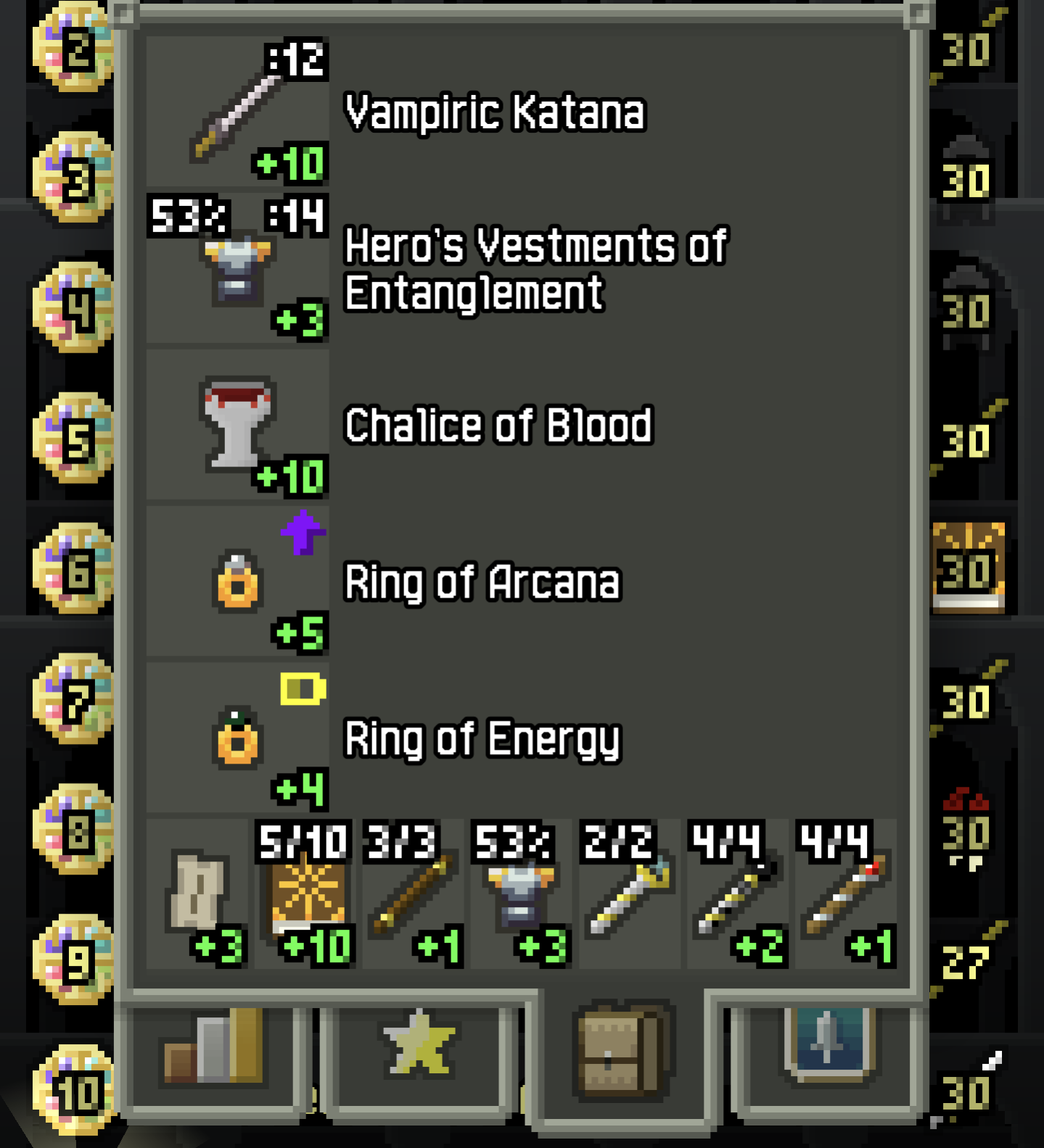
I had a +10 Vampiric Katana, which was doing real work with the +5 Ring of Arcana.

During the run I found and ID'd a Grim weapon and Ring of Haste plus a bunch more. (Scroll of Divination is great for "finding" all rings for Trinity.)

I was using Grim for the entire ascent, one-shotting almost everything. First blind them, and then when they step into range, you get a guarenteed hit. That was killing almost everything with Grim. With Ring of Energy +4, I never once ran out of armor energy. The Heroic Energy talent was also key.

When I had to fight a scorpion, I could activate Spirit Form for Ring of Haste and chase them down with ease.

It was honestly one of the easiest ascents I've ever had. The flexibility of Trinity is really cool.

During the descent, I used it a bunch for thrown weapons to soften up blind enemies from a distance since I ran out during the run.

view more: next ›

Quibblekrust

joined 10 months ago