459
me_irl
(lemmy.radio)
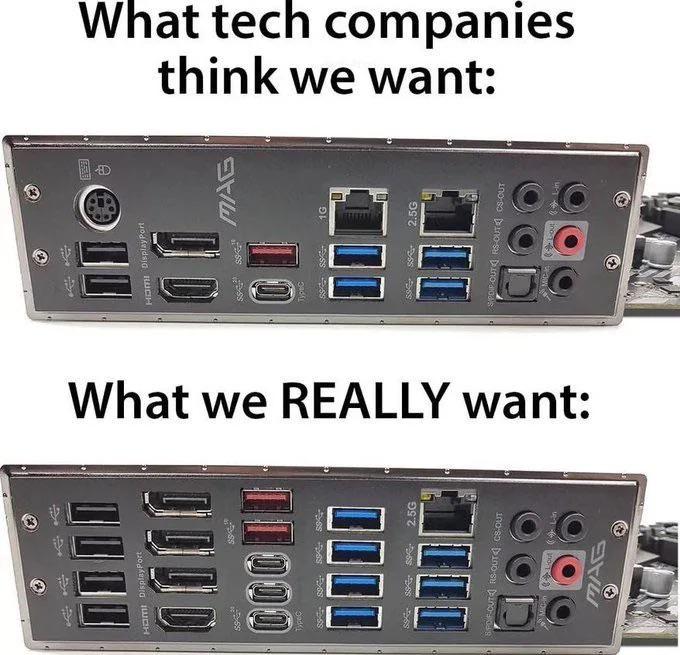
All posts need to have the same title: me_irl it is allowed to use an emoji instead of the underscore _
Actually:

The on-board video ports are for emergencies when your actual GPU isn't working. One of each type is plenty.
That 2.5 Gb Ethernet isn't giving me any actual benefits in practice as no other component in the network supports it anyway. If you need more speed, go all the way to 10 Gb.
No one really has toslink equipment anymore and the optical standard on that connector is shit anyway. You literally get better audio from the analog ports.
Get rid of the fancy special USB ports as well as the legacy low-speed ports. Just give only the normal super-speed ports which always work well without odd hardware quirks or driver issues. And 4 are actually plenty. I connect at least one hub anyway.
Also don't waste precious PCIe lanes for useless bling like six SATA ports, multiple NICs, or Wireless. Just route the unused PCIe lanes to the PCIe slots. Maybe I want to add an AI accelerator later.
My phone doesn't fastboot on USB-3.
I'd like a 10G port on my motherboard. My router supports it which makes the network backbone 10G.
Add the usb c ports back
Agreed, there should be at least two. So many devices use USB-C now it's rather silly not to include it given it gets rid of an age old problem as well.
But you removed optical audio, USB C and/or thunderbolt, and chose the 1G ethernet over 2.5G.
Optical audio is somewhat an abandoned standard. The copper port is as good. And professionals use external devices connected to USB and synced in their digital audio workstation software now.
USB-C gets somewhat more frequent now. But USB-A is the mechanically superior standard for sort-of fixed installation (like on the back of a PC). And if you have a USB-C device, chances are, you also have an adapter already.
Thunderbolt is pretty niche. It's more a mac thing. It's nice to have - but 99.9% of the users don't have any matching devices and routing those PCIe lanes to a PCIe slot is better.
It is somewhat a hot take - I know. But if you really use the 2.5 G Ethernet, you probably want 10 G anyway. So just go for a board with that or add it via PCIe card.
Onboard video ports aren't really emergency ports anymore, they are low-end ports. High end CPUs don't have iGPUs at all, so the onboard video ports are completely non-operational.
I've was recently looking into different ways to get audio from a secondary media PC into an Audio Interface. I decided I wanted to keep the signal digital to use the higher quality DAC in the Audio Interface and decided TOSLINK would be the way to go. It seems like TOSLINK would be a good one size fits all solution for connecting a PC, game consoles, AV receivers, and HDMI splitters because they all seem to still include TOSLINK out ports.
I'm aware of the drawbacks, namely lower bandwidth and jitter. From what I read as long as you're just doing stereo audio like I plan to, TOSLINK can handle an uncompressed signal no problem. For the jitter, it seems modern devices with TOSLINK inputs have ways of mitigating jitter.
You seem knowledgable on the subject. Is what I wrote above accurate or is there something I'm missing when it comes to TOSLINK audio?
For stereo, TOSLINK is fine. But so is the copper port right next to it. I removed it because it's basically unused fluff for more than 99.9% of all users. I used that port (on a dedicated sound card) once to connect a DTS 5.1 active speaker system (marketed at gamers like me) back in the 00s. It doesn't really have enough bandwidth for 5.1. But I'm no audiophile, so it was fine. Thing is: Just plugging in the copper cables works as well and provides the full bandwidth.\
And motherboard-integrated DACs are pretty good now. Even audiophiles can't hear the improvement in stereo in blind tests (they probably can hear copper sounding better in 5.1 though).
It's basically the Betamax of audio connection standards. Technically better, but market adoption is negligible.
toslink was cutting edge in, oh, 1985. Bit on the limited side for bandwidth now.
You're not wrong, but if it has the bandwidth for stereo 24 bit 96kHz lossless digital then why does it matter? The main problem is it gets the clock rate or whatever from the signal itself making it susceptible to jitter, but I think modern devices mitigate that.