1
14

Adam from PCWorld is a lifelong trackball user who has been using Kensington's previous Expert Mouse for a long time. He reviewed the new TB800 EQ.

2
14

Been liking my GameBall so far but are there any Kensington users? What they are like?

3
21
4
18

(Cross-posting this from !3dprinting@lemmy.ml. Hopefully I'm doing it the right way, sorry if not! I know there's like threadiverse cross-posting meta going on about cluttering up people's timelines and such.)

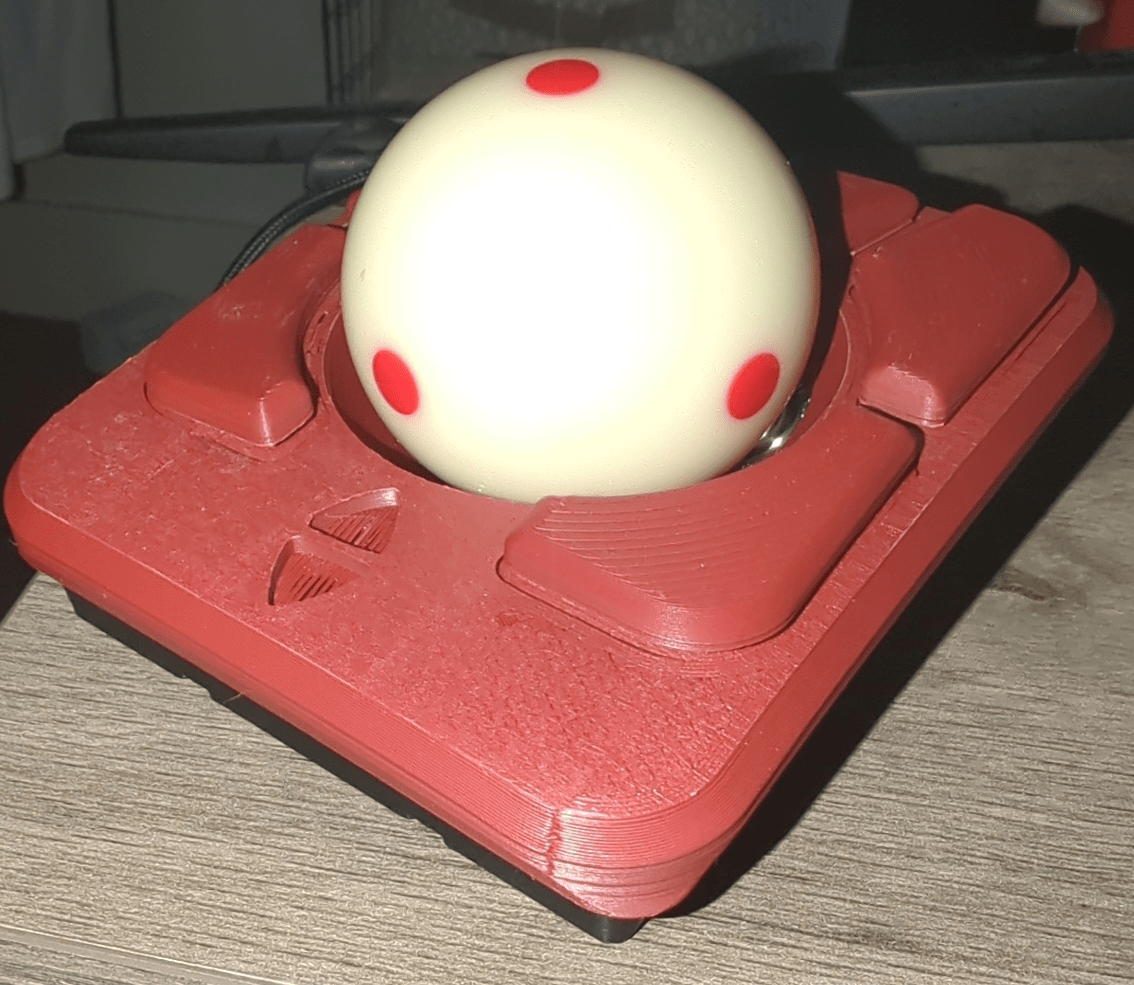
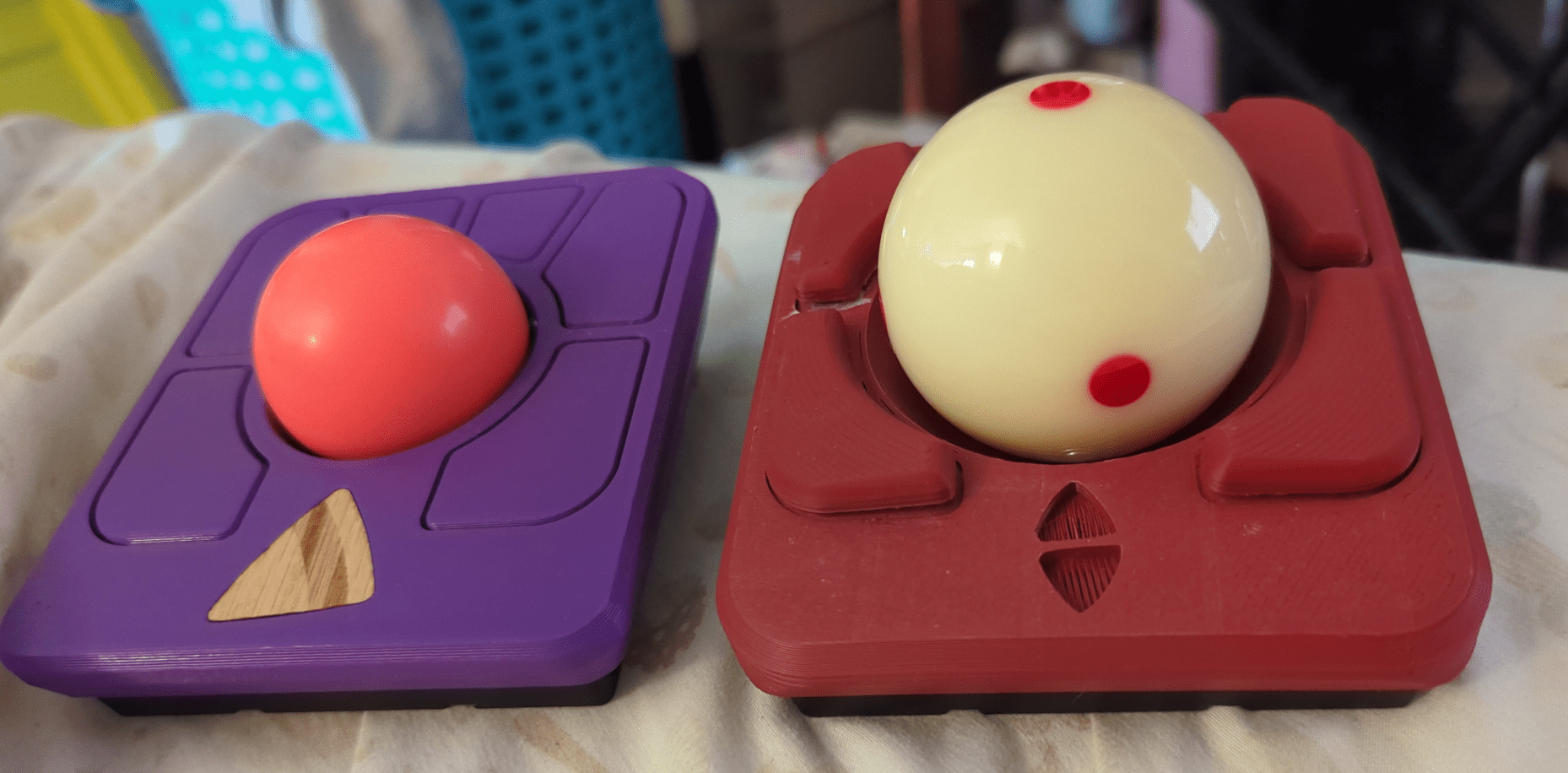
This is the 57-68mm ball size version, with an Aramith tournament series cue ball and Rexroth BTUs. I printed the new parts out of PHA, both for sustainability and because I just LOVE the way it feels, almost kinda leathery? It's got the new hi-res scrolling firmware that Ploopy released, although it took some fiddling (this, basically) in Linux to get it to work right.

So, as some people have said about this mod already, the stiction is really almost too low. To compensate, I have my sensitivity turned way down and mouse acceleration turned off. Even then, you really have to use it on a stable surface for any accuracy. I used to use my unmodded one on the bed occasionally. This one rolls so freely that any shifting of the surface beneath will get the ball drifting around. Still, it doesn't take too long to adapt, and I don't think I'd go back. Also the noise isn't nearly as loud as some people have said, and it's not an unlikable sound anyway.

There's a hi-res scrolling Ploopy Knob on it's way in the mail right now, and once it arrives, I think I might switch this Adept to Plodah's alternative firmware. It may not have hi-res scrolling, but it has SO MANY other features! In particular, I could replace the dragscroll button with Plodah's "sniper mode" button, which seems super useful.

Comparison with the unmodded Adept:
5
11
submitted 5 months ago by foo@feddit.uk to c/trackballs@discuss.tchncs.de

cross-posted from: https://feddit.uk/post/32994623

Does anyone have experience of Ceratech's trackballs? There doesn't seem to be a lot of info or reviews about them. I wonder how they compare to the Logitech & Elecom offerings.

6
3

Hi, I'm currently using an old Logitech M570 at work and I'm looking to buy a trackball for my home pc as well. I have a Logitech G502 at home and will likely be alternating between those two.

I'm pretty happy with the overall feel of the M750 so I was thinking about the Logitech Ergo M575 or 575S. The MX Ergo S also looks good with the ability to tilt, but it's too expensive imo. I would like it to stay under 50 €.

One thing that concerns me is the durability of the mouse switches. I already had to replace my G502 once because of Logitech's dreaded double click problem and I'm starting to get the same symptoms on the M570. Is this something I still sould be concerned about?

Which other manufacturers or models would you recommend?

7
4

I've been using the Elecom Deft Pro and Huge for a few years now. Huge I haven't used anymore for months. I guess I'll start there.

Cons of the Huge is, well, it's huge. The wrist rest area is awkwardly angled for my wrist, especially if I'm using ~~my stupidly purchased weeb mousepads, IYKYK~~ a separate wrist rest. It makes me put my whole arm way to extended. Otherwise I like the huge ball size. Speaking of angles, I never really tried to get wedges to bring the Huge more vertical. I did put a small wrist rest on the left side to bring it up a bit and do find it more comfortable.

On to the Deft Pro, cons would be I'd like it to be a bit bigger I think? Especially the ball, but it's functionally solid. Works much better with a separate wrist rest. Since it's small it's my office mouse that I lug around in my bag.

Both have started to get unintended double clicks. I never really have that much stiction problems with mine, but maybe my standard is low as these are the only two trackball mice I use.

Should I go with the ploopy classic? but I'll miss the extra buttons the elecoms have. not that I use it for anything important, mind you. I just assigned shortcuts to go left/right of tabs in my browser.

Maybe the adept? I never has a symmetrical trackball since the PS/2 kensington Orbit I knicked from my dad's stash that started my on my trackball journey.

Should I go with the gameball? Like I do game, but not in anything PVP or competitive.

Or should I just buy a new Deft Pro? I really don't have that much to complain. Even the ball size is a nitpick I could live with. The Huge really has to fix it's hugeness. So I wouldn't really buy it again.

8
12
Cinque (kbd.news)

cross-posted from: https://piefed.zip/post/159752

9
9
10
25
What do we think? (sh.itjust.works)
11
3

It's a looong read, but very interesting if you are into input device choices.

12
10
submitted 7 months ago* (last edited 7 months ago) by cronenthal@discuss.tchncs.de to c/trackballs@discuss.tchncs.de

Babe, wake up! Kensington has shown a new trackball design concept.

13
7
14
18
15
12
16
80

ELECOM EX-G Wired Trackball, my first diversion from Logitech in the trackball world. While Logitech was busy removing a wire from a stationary object, Elecom was out here adding buttons.

I also have a wireless version for travel.

17
10

Results were favorable. The trackball provided a 60.1% increase in throughput over the standard controller for novice participants. More impressively, it was shown to provide a 58.7% increase in throughput for participants already adept with the use of a standard controller.

18
48

I've been rocking the Kensington Orbit wired for years now and I've yet to find a better trackball.

Reasons:

  • works for both hands
  • scroll ring
  • big ball
  • wired
  • works reliably

I use the trackball with my left hand and a mouse with my right.

It seems like such a cheaply made product, but it just works so very, very well.

19
21
GameBall (sopuli.xyz)
submitted 8 months ago* (last edited 8 months ago) by QuentinCallaghan@sopuli.xyz to c/trackballs@discuss.tchncs.de

In my previous job I tested Logitech's Marble Trackball mouse and fell in love with it in no time. I decided to buy a similar trackball for home use with more buttons and ordered the GameBall.

My PC is already an "RGB hell" so GameBall's changing light color works as a natural extension aesthetically. The trackball requires no additional software to be installed, and any button settings can be adjusted for one's liking. There's a dedicated button for changing the DPI. The DPI button is really useful for tasks where I need to be more accurate, such as music editing and mixing.

Well, it's a gaming mouse, how it works for gaming? I don't really play FPS games and I mostly use a gamepad, but I'd say that GameBall could be a fitting option. Someone who plays FPS games actively with trackballs could have a more thorough opinion regarding this.

Around the ball are two touchpads that function as scroll wheels. That allows for horizontal and vertical scrolling when zooming large images for example, so that's what I find useful.

During the first weeks of use I had to get my hand to accommodate to the mouse, which made daily use somewhat awkward. After that however things go really smoothly, there's no turning back from trackballs for me!

20
37

Trackball users community

203 readers
2 users here now

A community for people using or interested in using trackballs, the arguably superior input device.

founded 8 months ago
MODERATORS