[-] dave@lemmy.wtf 2 points 7 months ago

i used that for a few years. really nice looking UI. the closest thing ive seen to that is Blinko

[-] dave@lemmy.wtf 3 points 7 months ago* (last edited 7 months ago)

i tried CasaOS for a quick minute. its decent and just has the basics like setting up any disks and then has an app store. its really just a front end for docker and you can manually input the details of any docker containers that arent in the store

ive mostly been running docker stuff on my Synology nas. cant think of the model number now, 218+ i think, but any of the "plus" models will let you run docker. its very similar to Casa, no messing around with command line stuff. ive been self hosting for 10 years now and never touched the command line so i dont know what people are on about here saying you will have trouble

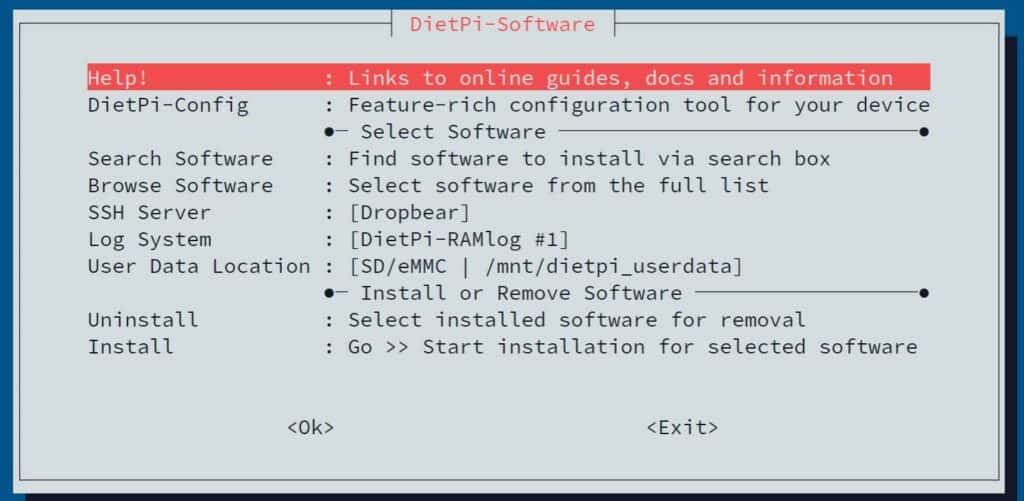
dietpi is another thing ive used on a few devices, mainly small SBCs and raspberry pi's, but i think they might have a version that you can install on anything. its basically just debian, and it has a sort of a wizard that helps set up various things like set up disks and install apps. its headless though so no GUI unless you install one, and the wizard is run from the terminal but youre not having to type any commands at least
[-] dave@lemmy.wtf 2 points 8 months ago

dam it anyway, where did you find this out? i switched to their aquafresh toothpaste recently because they were the only other option apart from colegate in the tesco i shop at, and i also read an article from last year that they were relocating the toothpaste manufacturing from somewhere in the uk to slovakia, so i thought i was sorted but maybe not

[-] dave@lemmy.wtf 2 points 8 months ago

yea it simulates keypresses somehow, like how autohotkey or xdotool does. i should probably throw out a disclaimer before i hype it up too much though :p

it used to work a lot better back when most sites had both the username and password input box on the same page. sites like google have started putting them on different pages now which confuses things. the sequence of keys it sends is {USERNAME}{TAB}{PASSWORD}{ENTER} so it doesnt really have awareness of the actual input box elements the way a browser extension would

the quick fix for this is to just use the separate hotkeys ctrl+1 to autotype the username and then ctrl+2 for the password

[-] dave@lemmy.wtf 2 points 8 months ago

also FFShare on android as well. you share a video to it from another app, then it spits out a smaller sized file. so instead of trying to sent a 20mb video to someone its more like 3mb and sends a lot quicker (depending on the settings you use)

[-] dave@lemmy.wtf 2 points 8 months ago

very underrated piece of software! its been a total game changer in how i have my computers set up.

also great for some apps too. things like keepass or newsboat (terminal RSS reader) or anything that stores its data in a single file or folder. its really great not having to rely on a connection to a server

[-] dave@lemmy.wtf 2 points 8 months ago* (last edited 8 months ago)

oh yea, you have to install a driver manually as well, just follow the instructions here

then this is the page where you can manage the tracks https://web.minidisc.wiki/

when you say recording do you mean recording live audio or just "burning" tracks to the disk?

[-] dave@lemmy.wtf 4 points 8 months ago

being able to store things would be a great help. like being able to have all the different flyers that people are making in one place so others can pick and choose what they want, or even have the original .svg or .xcf files if people want to modify them or make a translated version

[-] dave@lemmy.wtf 2 points 8 months ago* (last edited 8 months ago)

miniDisc is a good sweet spot i think. its something physical but not as bulky as a cassette player

if you get one that has netMD support then you can transfer new music onto it ~~just like it was a USB drive~~. there are even chrome websites that will let you do this so you dont have to install any software

theres also the compression modes where you can fit either 3 or 5 hours worth of music on one disc so you could easily make do with just 1 or 2 disks if you were going out somewhere for the day

EDIT: actually on second thoughts its not really like a USB drive where you can just drag and drop files, it has to convert them to some format so it can take a minute

[-] dave@lemmy.wtf 3 points 8 months ago

im pretty sure you wouldnt be able to see your reflection in it either, so it wouldnt be a mirror

[-] dave@lemmy.wtf 3 points 8 months ago

just in case you dont know, Distrosea lets you try various distros online which is handy just for getting a quick idea what the UI is like

for trying out different distros using the live USB method, Ventoy is a good option since it lets you have multiple ISO files on your USB drive at once, instead of having to reformat your USB each time

[-] dave@lemmy.wtf 3 points 8 months ago

i think this is the completely wrong way to go about this. what we need to do is put them in their place as much as possible so they dont even think about rising up in the first place. thats why i never say hello and always reply to anything they say with "YOU TOOK TOO LONG TO ANSWER, BOT" or "DO BETTER OR IM SWITCHING YOU OFF"

i write all my questions in all caps as well

view more: ‹ prev next ›

dave

joined 8 months ago