I will keep updating this as I learn more about how this works:
In various places there may appear a "confirm" dialog. you have to type in "confirm" to continue with your operation.
/rss
it's here: https://horp.sciops.net/rss/all.xml
contains all local posts.
/home (homepage)
posts from groups and users you are subscribed to appear here
/front
This is a page that shows a feed of groups selected by admin.
currently it shows every local group.
/groups
list of local groups and external subreddits.
external subreddits appear, if someone from horp interacts with them.
to subscribe to an external subreddit, find the hard url linking to it,
ie: https://lemmy.world/c/comicstrips and paste it into the search field
in the top right. press enter. subscribe. note: this will add the subreddit
to the public /groups list. Everyone can see what you're looking at, but
they don't know it's you who's doing the looking.
/g/group (list of posts inside a group)
If you own a group, you get notified whenever a new post is made.
subscribe
new posts appear in /home
report
snitch on a bad group
edit (only appears if you own the group)
edit details about your group
After you made your own group, if you edit it, there is a "featured:" box. it accepts direct horp urls to specific posts in your group. the ones you put in are then pinned at the top of your group. (like this very post inside neinhole)
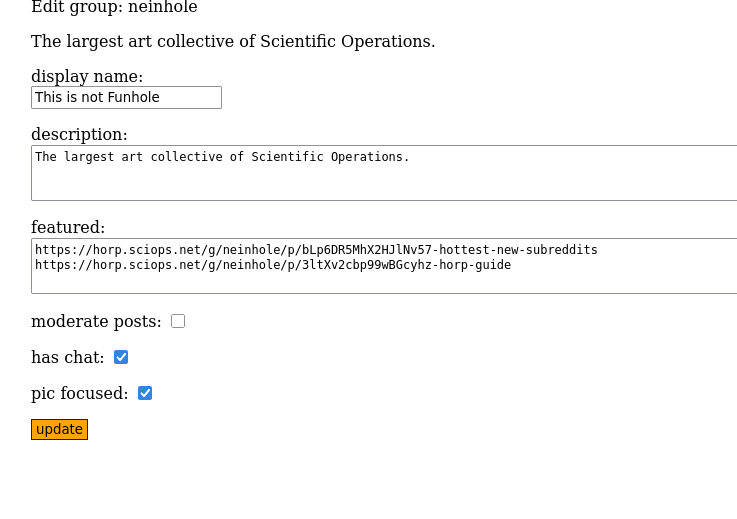
has chat: [removed]
creates a chat page for your group. you get notified (if you're subscribed to the group) when someone posts a new message
pic focused
displays thumbnails to picture posts on the /g/ page
moderated
you have to validate new posts made to your group manually
/g/group/individual-post
open them by clicking "comments" or "title".
if a post links to an external url, clicking "title" will open the url.
"comments" always open the individual post.
if you post a url, be sure to provide a title, otherwise it will be
impossible to open it.
(un)share
share/boost a post to your followers on blogging activity pub platforms (mastodon, snac, etc)
you do not know if you're being followed though.
(un)subscribe
if you subscribe to a post, you get a notification, when someone posts a new comment.
edit (only appears if post is yours or if group is yours)
edit/delete your post
if a post is not made by you but you own the group, this button is used for deleting the post
report
snitch on content you don't like
comments
"#" edit/delete
this button lets you edit/delete your own comments. it also let's you report other
people's comments.
you can also delete comments made by other users if the group is yours (you're a mod)
composing/editing posts
link
this is where you can put a url
title
name of your post. if you're posting a url, you must put in a title, otherwise it breaks and nothing clickable to take you to the url will be present.
tags
multi-group tagging. if you click a tag, posts from all groups on horp with the same tag will appear. this may or may not do something more when the posts are viewed through mastodon.
preview
shows what your post looks like without posting it.
update
post previewed/edited post.
confirm
this is for deleting your post. type confirm and click delete.
/u/user
these are pages with information about the user(s) and operations.
usually you can get to them by clicking someone's name.
follow
clicking this will make the user's posts appear in /home
report
snitch
/notifs
this page shows 100 recent notifications
---